
Working with agents
Engines and models
Pragma drives the agent CLIs already on your machine, and can run a model on it too. Your subscriptions stay yours.
Pragma starts supported agent command-line tools on your computer and normalises what they produce into one event stream, which is what lets a single interface handle very different agents without flattening them into the same thing. It can also run a model itself, on this computer: see Running a model on this computer.
The practical consequence: what you can use, and who bills you for it, is decided by which CLI you have installed and signed in to. A model Pragma runs on this computer bills nobody.
The engines
| Engine | How it authenticates | Notes |
|---|---|---|
| Claude | Claude CLI login | The fullest support: tools, approvals, sessions, local computer use |
| Codex | Codex CLI login | Model discovery, approvals, steering, computer tools |
| Grok | Grok CLI login | Local model catalogue and sessions |
| Cursor | Cursor Agent CLI login or API key | Live model discovery |
| Kimi | Kimi CLI login | |
| Droid | Factory Droid CLI login | |
| Antigravity | Google Antigravity CLI login | |
| OpenCode Go | OpenCode login | |
| Qwen | Qwen CLI login | |
| Hermes | Hermes CLI login | |
| Pi | Pi CLI login |
An engine that is not installed or not signed in stays visible with the reason, rather than vanishing and leaving you to work out what happened.
Detection
Pragma looks in the inherited process path, the usual installation directories, and your login shell. Install or sign in to a CLI, then restart Pragma and check the picker.
When that fails, set the path yourself: Settings, then Engines, then choose the executable. This is the reliable answer when you use a version manager, a wrapper script, an unusual install location, or when you launch Pragma from a shortcut whose environment differs from your terminal's.
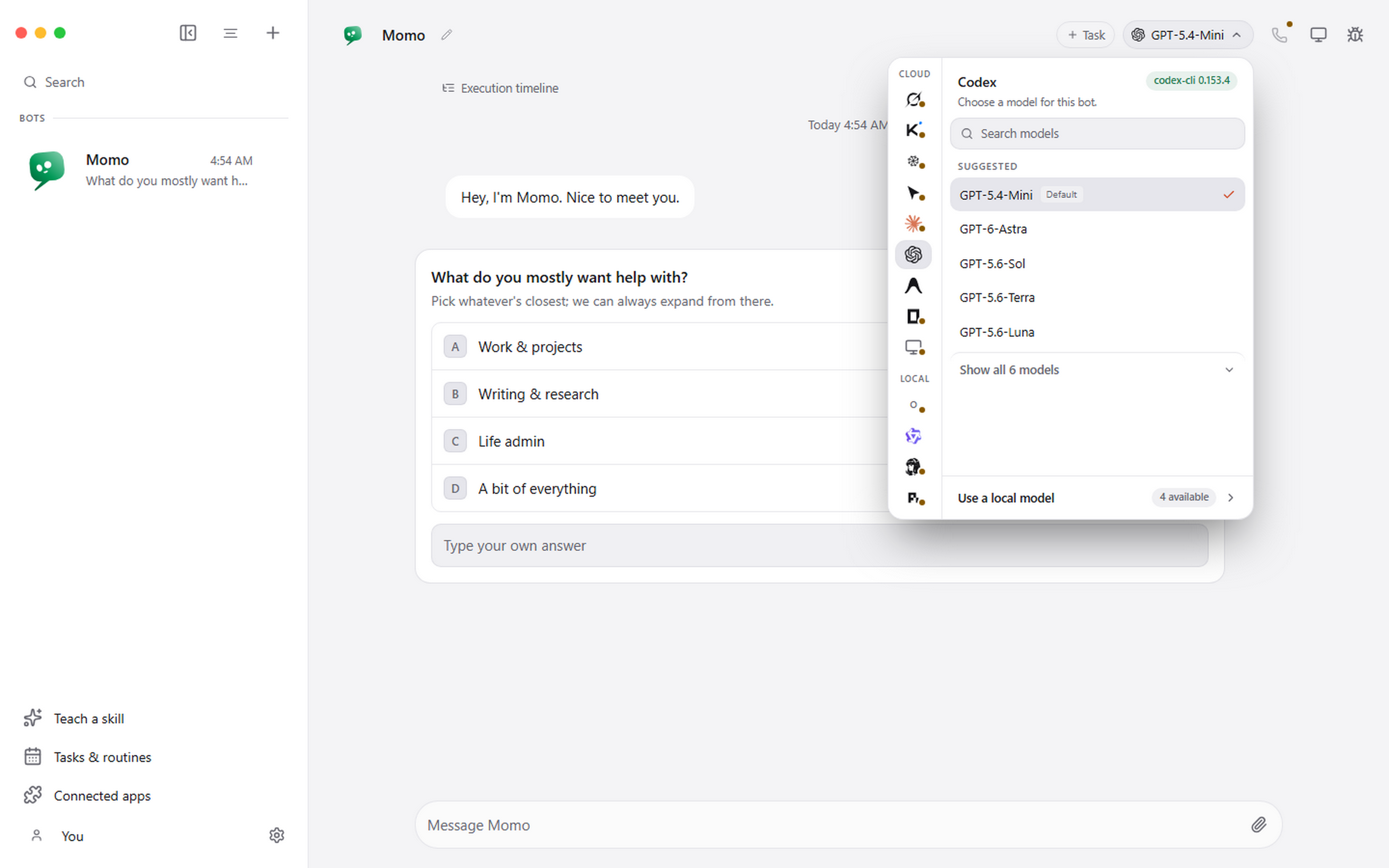
Choosing a model
The picker groups by provider and marks the defaults. Engines that can report their catalogue refresh it from the installed CLI, so a model released this week appears without an update to Pragma.
A model change applies to the next turn. Earlier messages keep the model that produced them.
Reasoning effort
Under the models, Effort lists the levels the chosen model supports, plus Default: low to max on Claude (Haiku has none), per model on Codex, and low, medium or high on Gemini in Antigravity. The chip at the top shows the level when it is not Default. A change applies from the next turn. Codex keeps a thread's last level, so going back to Default there applies from the bot's next new task.
Your own MCP servers
Claude Code and Codex start with Pragma's own tools only, not the MCP servers from your own setup, because every turn would otherwise wait for all of them, including ones that fail to connect. To give your bots your own servers, turn on My Claude Code tools or My Codex tools next to the engine in Settings, Engines.
Running a model on this computer
Pragma can download a model and run it itself, with nothing else to install. Choose Qwen, Claude Code or Codex for a bot, open the model picker, and choose Download next to a model under On this computer; Settings, Local models has the same buttons. Each download is kept only when it matches its published checksum, can be paused, and carries on from where it stopped. The first one also fetches a copy of llama.cpp to run the models: 32 MB on Windows, 11 MB on a Mac.
Two models are offered:
- Qwen3.5 9B, a 5.7 GB download and the one to start with. It is dependable with tools and with your connected apps, and uses about 7 GB of graphics memory.
- Qwen3.5 4B, a 2.7 GB download that is lighter and quicker on smaller graphics cards, using about 5 GB. It is less dependable with connected apps.
Each one says how it would sit on this computer: it fits your graphics card, it runs partly in system memory and is slower, or it is too big for this computer. Pragma works that out from your graphics card and memory, on this computer. A Mac with Apple silicon has no separate graphics card: its graphics share the Mac's memory, and what fits is worked out from the share macOS lets them use.
Bring your own model in the same place takes any GGUF model from Hugging Face, by its name or a link, or a GGUF file already on this computer. Pragma reads what the model says about itself before anything downloads: one whose chat template has no place for tools cannot drive an agent and is turned away, and one trained for a short context gets a warning. A download from Hugging Face is checked against the checksum Hugging Face publishes for it. A file from this computer is used where it is, and removing it from Pragma leaves the file alone. Pragma has not tested these models with every engine, so how well they work varies.
Once one is downloaded, pick it in the same place. The model starts when a bot first uses it, and that first reply takes longer while it reads the engine's instructions; later replies reuse what it read. After 15 minutes without use it frees the graphics card, and it wakes on the next message.
Pragma gives Qwen only the tools a bot works with, and your connected apps come with them, so a conversation starts with most of the model's 128K window still free.
Models are large. Move to another folder under Settings, Local models puts them on whichever drive has room, and new downloads go there too. A download that would not fit on its drive is refused before it starts, rather than failing partway.
It runs on this computer only, answers nothing but Pragma, and stops when Pragma quits. It needs Windows on x64 or a Mac with Apple silicon. An Intel Mac cannot run these models fast enough for an agent, so Pragma does not offer them there; every engine above still works on it. Delete in the same place frees the disk space.
What this means for cost
Your existing subscription or API key decides access and billing. Pragma does not turn one provider's subscription into access to another, and it does not add a margin, because your messages never pass through anything of ours. A model running on this computer costs nothing per message; it uses your graphics card instead.
Per-task token counts and costs are shown in the conversation header, taken from what the engine reports.